What you need before you start
Access to your profile
You need to be able to log in and edit your Google Business Profile today.
Google Maps, nothing else
No account, no software, no card. Paid grid tools are optional and come later.
About two hours
Twenty minutes to diagnose. The rest is the work, spread over weeks.
Bookmark this page before you start. You will want it again at week 3, week 7 and week 12, and the diagnosis section is worth re-reading every time you run a new scan.
PART ONE
How Google actually picks the three businesses in the Map Pack
Before you change anything, it helps to know what you are changing. Google is unusually open about this one. Local results are ranked on three factors, and everything in this guide is just a way of moving one of them.
Relevance
Do you match what was typed?
You control this
Distance
How far are you from the searcher?
Fixed. You cannot move
Prominence
How well known are you, everywhere else?
The lever in this guide
Relevance
How closely your business matches what was typed. This comes from your primary category, your listed services, and the content on your website. If someone searches emergency plumber and your primary category is Plumber, you are relevant. If your primary category is Contractor, you are less so, even though you do the same work.
Distance
How far your business is from the person searching, or from the place they named in the search. This is the factor you cannot directly change. Your building is where it is.
Prominence
How well known and well referenced your business is. Reviews, links, mentions across the web, directory listings, and how well your website ranks in normal organic search. This is the factor with the most room to grow, and it is the one that does the heavy lifting in this guide.
The idea that makes the rest of this make sense
Think of every business as having a reach, like a radio signal. Distance weakens the signal as it travels. Prominence is transmitter power. A weak business with a nearby transmitter beats you locally. Turn your power up far enough and you keep winning further and further out, even against businesses sitting closer to the searcher.
That is the whole game. You are not beating distance. You are buying enough prominence that Google is willing to overlook it.
Two consequences worth holding on to. First, radius growth is gradual, because you are pushing an edge outward rather than flipping a switch. Second, the further out you go the more prominence each additional mile costs, because you are competing against a denser field of businesses who are all closer than you are.
One note if you are a service area business without a storefront, like a mobile locksmith or a moving company. Hiding your address does not remove distance from the equation. Google still ranks you from a pin. Setting a large service area tells Google where you will travel. It does not tell Google to rank you there.
PART TWO · STEP 1
Map where you actually rank
Almost every owner checks their ranking by searching their own service and seeing where they land. The trouble is where you searched from. You are nearly always at your office or your home, which is the single place on earth where your distance score is perfect.
Move two kilometres and the result changes. Move ten and you may not appear at all. There is no such thing as your ranking. There is only your ranking at a specific point on a map.
A geo-grid scan solves this. It checks your ranking from dozens of points spread across your area and plots each result. Instead of one number you get a picture, and the picture is the diagnosis.
Do this now · about 10 minutes · free
You do not need to buy anything or sign up for anything. This is the same method we use to produce the maps in our own client reports.
- 1Open Google Maps in a private or incognito window. Signed out, so your own search history stops flattering you.
- 2Search the keyword that pays. Not the one with the biggest volume. The phrase someone types with their wallet out. Emergency plumber, not plumbing services.
- 3Pick three checkpoints before you start. Your own front door, a town roughly halfway to the radius you want, and a town right at the edge of it. Write the three down.
- 4For each checkpoint, drag the map until that town fills the screen, then click Search this area. Google reloads the results for that spot rather than for where you are sitting.
- 5Count down the list on the left until you find yourself. That number is your position at that distance. If you are not in the first twenty, write down not found. That is data too, and it is the most useful kind.
- 6Screenshot each one with the date and the keyword written on it. Three screenshots, three distances. That is your radius, and it is your baseline for 90 days from now.
One caveat worth knowing. This checks the map area rather than a phone's GPS, so it is an approximation of a real searcher standing there. It is also the same approximation we use in paying client reports, and it is close enough to make decisions on.
Your three checkpoints
But do I need a grid tool for this?
Not to start, no.
Tools like Local Falcon, BrightLocal and Places Scout check 49 points instead of your three and hand you a tidy score for it. They are genuinely better, and we use them. They also want an account and a card.
Your three checkpoints answer the only question that matters today: how far out do I stop showing up. Get that answer for free this evening. Buy the resolution later, once you have something worth tracking month to month.
Nobody should be signing up for software to find out whether they have a problem.
What a full grid scan looks like
This is 49 points, the version a paid tool produces. Your three checkpoints are a cheaper cut of exactly the same picture: strong at the centre, fading outward. You are looking for the same shape either way.
You did this right if
You can answer this question with a number: at roughly what distance from your front door do you fall out of the top three? If your three checkpoints were all green or all red, you picked them too close together or too far apart. Move the middle one and check again.
PART THREE · STEP 2
Diagnose the shape you are looking at
Four patterns come up again and again. Each one points at a different cause, and each one sends you to a different fix. Read your grid, find your shape, and skip to the part that applies to you.
Green core, red edges
You are strong at home and fade in every direction. This is the normal, healthy starting point and it means your foundations are fine. You simply have not built enough prominence to reach further.
Go to fixes two and three. Do them in that order.
A very small green core
You are only in the top three within a kilometre or two of your own door. The issue is not reach, it is that you are weak even at point blank range. Expanding outward now would be building on sand.
Go to fix one. Do not touch city pages yet.
Patchy, no clear shape
Rankings jump around with no relationship to distance. This is almost always a relevance problem. Google is not confident about what you actually do, so it surfaces you inconsistently.
Go to fix one and pay particular attention to categories.
Strong in one town, dead in the next
The drop off follows municipal boundaries rather than distance. You have a body of proof in one place and none in the other.
Go to fixes two and three, aimed squarely at the dead town.
FIX ONE
Turn the transmitter up: your Google Business Profile
Your profile is the cheapest prominence you will ever buy, and most businesses complete about a third of it and stop. It is also the fastest moving lever in this guide, because Google re-evaluates profile data continuously rather than waiting to recrawl a website.
Why this works
Your primary category is the strongest single relevance signal you control. It tells Google which set of searches you belong in at all. Everything else on the profile refines how confidently you sit in that set.
Do this, in this order
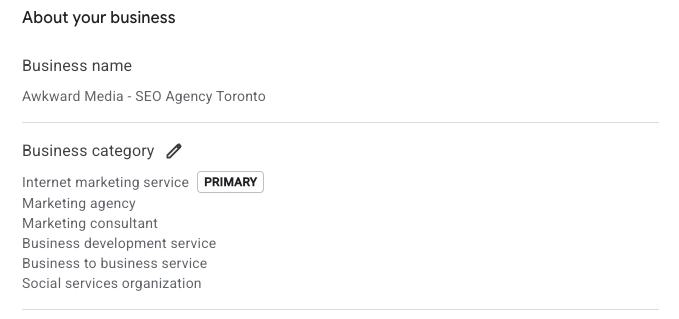
- 1Set one primary category that exactly matches your money keyword. If you scanned for emergency plumber, your primary category should be Plumber, not Contractor. Change nothing else on the profile for a week and watch whether the grid moves. This one change alone often shifts things.
- 2Add secondary categories only for work you genuinely do. Padding the list dilutes rather than adds. Three accurate categories beat nine hopeful ones.
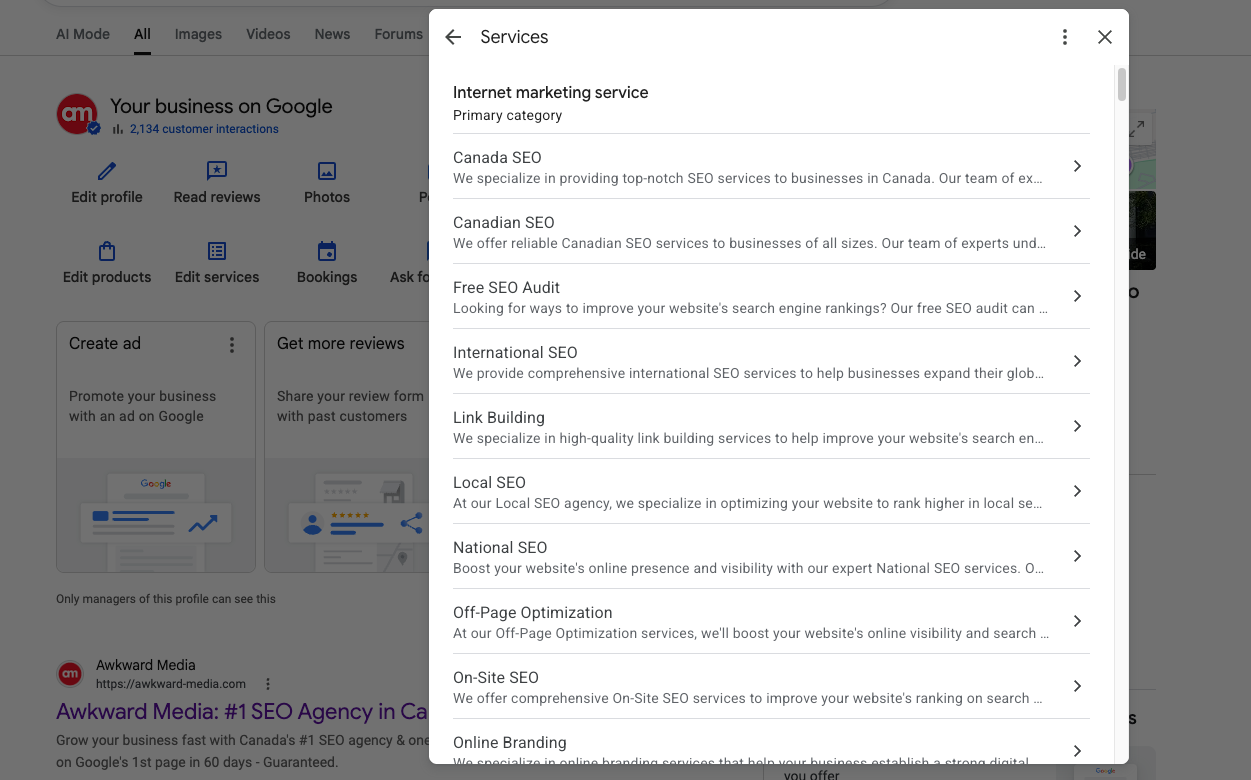
- 3List every service separately, each with its own description. Write them the way a customer would describe the problem, not the way your industry names the product.
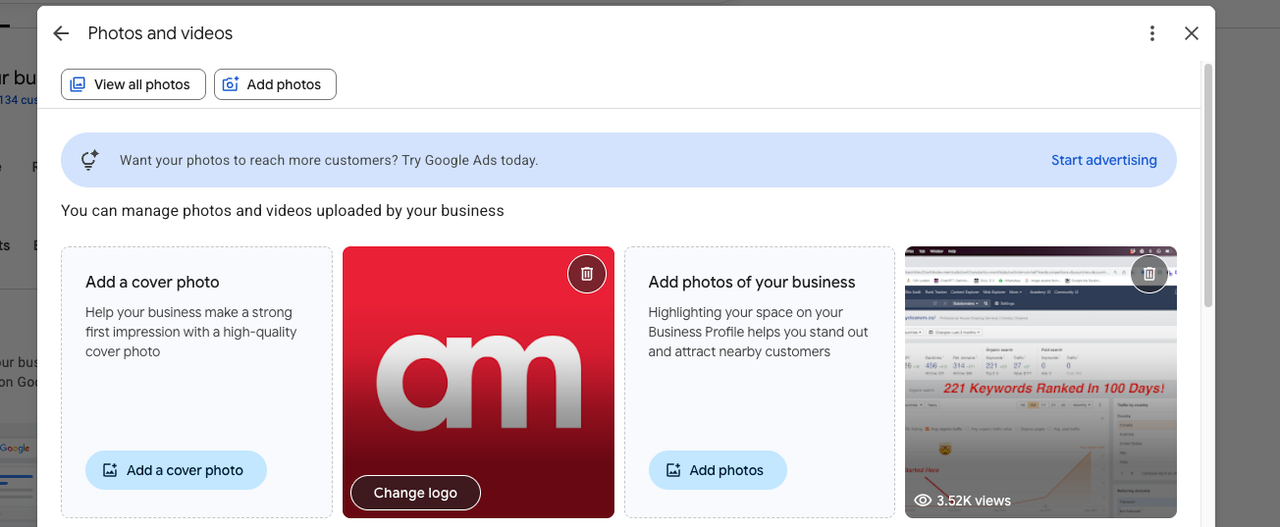
- 4Add photos on a schedule, not in one burst. A few a week beats forty in an afternoon. Recency and consistency are what get noticed.
- 5Seed the questions section with real questions. Use the ones customers actually ask you on the phone, and answer them properly. You are allowed to ask and answer your own.
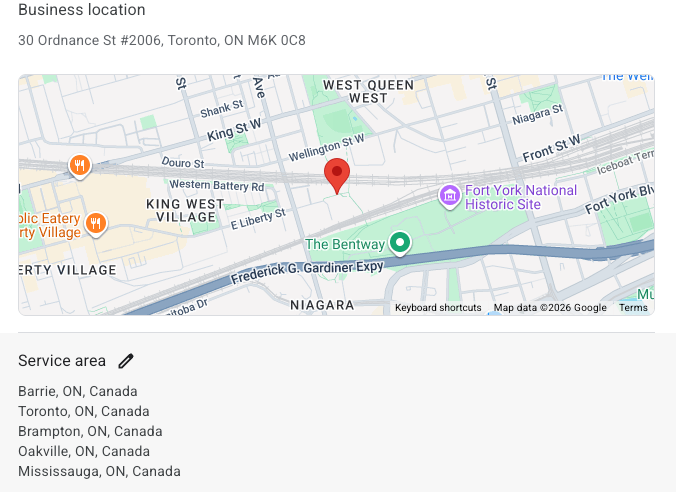
- 6Set your service areas to the towns you named, not a lazy fifty mile circle. Be specific about where you will actually travel.
Common mistake
Stuffing keywords into your business name, as in Smith Plumbing Emergency Plumber Toronto. It does move rankings in the short term, which is why it is tempting. It is also against Google's guidelines, your competitors can and do report it, and the resulting suspension costs far more than the gain. Use your real trading name.
A second one worth retiring: geotagging your photos before uploading. Google strips location data from images on upload. It does nothing.
When you will see it: category changes can move a grid within days, and usually within two weeks. This is the fastest feedback loop you have, which is exactly why it goes first.
FIX TWO
Build city pages that deserve to rank
This is where most businesses go wrong, and they go wrong in the same way. They take one page, swap the town name fifty times, and publish fifty pages. Google has recognised that pattern for well over a decade. It has a name, doorway pages, and it is explicitly against the guidelines.
Why this works
A city page does two jobs at once. It gives Google a relevance signal connecting you to that place, and if it ranks organically it raises your overall prominence, which is one of the inputs to your Map Pack position. A page that ranks helps your map. A page that sits unindexed helps nothing.
What a real city page contains
- ✓Photographs of your own work in that town. Not stock. The van outside a house on a street that exists.
- ✓At least one named job. The neighbourhood, what the problem was, what you did, roughly what it cost. Specifics are the whole point.
- ✓A review from someone who lives there, quoted with their first name and area.
- ✓Information that only applies to that town. Permit rules, the age of the housing stock, water hardness, parking restrictions, whatever your trade genuinely cares about. If a sentence would be equally true of anywhere, cut it.
- ✓An internal link from your main service page so the new page inherits some authority instead of sitting orphaned.
- ✓A title tag in the form Service in City, and a URL that matches. Keep it boring and literal.
Anatomy of a city page that ranks
Common mistake
Publishing twenty city pages in one week. Beyond the doorway page risk, you will have no idea which ones worked, and you will have spread thin content across your whole site. Build two. Prove they rank. Then build two more.
When you will see it: a new page typically needs four to twelve weeks to index and settle into a position. This is the slowest fix here, which is why you start it early and then leave it alone.
FIX THREE
Collect proof that travels
Prominence is mostly not built on your own website. It is built out of what other people and other sites say about you, which is precisely why it is hard to fake and why it counts for so much.
Why this works
Reviews and local links are third party signals. Anyone can write their own website. Not everyone can get forty people in one town to vouch for them, which is exactly why Google leans on it.
What you say
Your own website
Anyone can write this. Necessary, and on its own it proves very little.
What everyone else says
- ✓Reviews naming the town and the job
- ✓Links from things rooted in that town
- ✓Listings that all agree on your details
Prominence
The transmitter power from Part One. This is what buys you distance.
Reviews
- ✓Ask on the day you finish the job, while the customer still feels the relief. A week later your reply rate halves.
- ✓Ask them to mention what you did and where. Review text is readable content, and it is one of the few places a town name appears in a customer's own words.
- ✓Aim for a steady trickle rather than a burst. Thirty in one week looks bought, because usually it is.
- ✓Reply to every single one, including the bad ones, in public and without arguing.
Local links
- ✓A link from something rooted in the town beats a stronger link from anywhere else. Local relevance is the whole point here.
- ✓The reliable sources: chambers of commerce, suppliers and manufacturers who list their installers, the youth team you sponsor, local news, community associations, trade bodies.
- ✓Sponsorship is the most underrated of these. It costs a few hundred dollars, it is a real relationship, and it comes with a link nobody else in your category has.
Listings consistency
Your name, address and phone number should be identical everywhere they appear. Old listings with a dead phone number or a previous address quietly undermine you, because they make Google less certain which details are true. Search your business name and phone number, write down every listing you find, and correct the wrong ones.
Common mistake
Filtering who you ask, so only happy customers get the review link. It is against Google's policy, and it also robs you of the thing that makes a profile look human. A perfect five with two hundred reviews reads as fake. A 4.7 does not.
When you will see it: weeks to months, and it compounds. This is the fix with the slowest start and the longest tail. It is also the hardest for a competitor to copy.
PART FOUR
The 90 day plan
Order matters more than effort here. The three fixes have very different speeds, so you start the slow one early and the fast one first, which sounds contradictory until you see it laid out.
Baseline, then the profile
Run the grid and save it. Then work through fix one completely. Change the category first and give it a few days on its own so you can attribute the movement.
Two city pages. Two.
Choose the two towns where you are losing the most revenue, not the two biggest towns. Build them properly. They need this long to index, which is why they start now.
Proof, aimed at those same two towns
Reviews and links, concentrated on the two places you just built pages for. Concentration is what makes this work. Spreading the same effort across ten towns produces nothing anywhere.
Re-check the identical three points
Same keyword, same three towns, same method. Anything else and the comparison is meaningless. Put the new screenshots beside your originals.
PART FIVE
What should actually happen, and what should not
Every guide should tell you what success looks like before you start, so you can judge honestly at the end rather than talk yourself into it.
By day 30
Profile work shows first. Expect the green core to firm up and widen slightly. If nothing at all has moved, your category is probably still wrong or a stronger competitor sits directly on top of you.
By day 60
The city pages start to index and rank. Look for improvement in the direction of those two towns specifically, rather than evenly in all directions. Uneven progress is the correct pattern.
By day 90
If all three fixes were done, the green and amber area should visibly cover more of the grid than it did at the start. That is the result. Then you repeat the whole cycle on the next two towns.
Day 1
Day 90
Things that will not happen, and we would rather say so
- You will not hold the top three across a full 50 miles in a competitive city in one quarter. Radius growth is incremental and it slows the further out you push.
- The grid will wobble between scans even with no changes. Local results are volatile. Judge the shape and the trend, never a single cell.
- Doing one of the three fixes rarely moves anything much. They compound. That is not a sales line, it is the reason order matters.
THE WHOLE THING ON ONE PAGE
Your checklist
PROOF
What this looks like when it is finished
One of our own clients, and the second half of it is more useful than the first because it shows you the ceiling as well as the win.
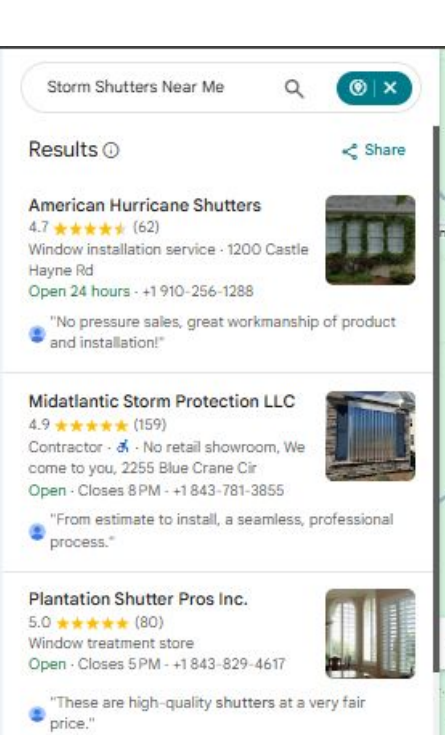
American Hurricane Shutters
Wilmington, North CarolinaSearching from Ocean Isle Beach, 52 miles from their front door, they hold position one. Not just for one phrase either. Storm shutters near me, hurricane accordion shutters near me, hurricane shutter companies near me, storm shutter installation near me, and hurricane shutters Wrightsville Beach. All at number one, all from 52 miles away.
Now the honest part
Move the search another 23 miles out, to Myrtle Beach at 75 miles, and they drop to 17th. On the harder phrases out there they sit in the thirties.
That is not a failure. That is the edge of the reach, and it is exactly what Part One described. Prominence bought them 52 miles. It has not yet bought them 75. The gap between those two numbers is what the next quarter of work is for.
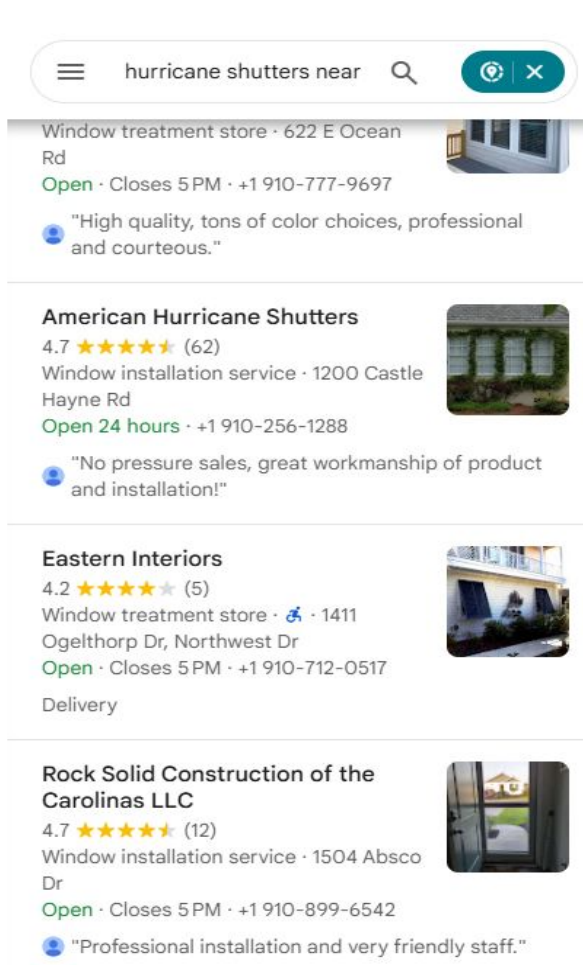
Figures taken from their January 2026 report. Same three fixes, same order as the ones above. Nothing in this guide was held back from you.
This is not the only one
Every campaign we run sits on one page, with the live result screenshots attached. Named clients, the exact position each keyword started and finished at, and the ones still climbing left in.
See all the case studiesStuck on the diagnosis?
On a Search Engine Mastery Session we run the grid on your business live, read it together and tell you which of the three fixes is the one actually holding you back. You keep the map whether or not you work with us.
Worth booking once you have run your own grid. Come with the screenshot and we can skip the first twenty minutes.